

VideoScribe
VideoScribe is proprietary software (*FREE for UBC students and staff via Canvas) available for OSX, Windows, and IOs users for quickly producing high quality engaging videos, no experience or skill required. It comes with a large library of images, and adding and customizing your own content is easy and intuitive. Drop in audio, images, and […]

SECTIONS Model – Assessing Technologies in the Classroom
The SECTIONS Model is an applicable framework that educators can use to evaluate the effectiveness of applying a certain technology in their classrooms. SECTIONS specifically refers to 8 different areas: Students, Ease of use, Costs, Teaching & Media, Interactivity, Organizational issues, Networking and Security & Privacy. Inquiry, creative thinking and digital literacy have gained significant importance […]

Code.org: unplugged and plugged activities
Code.org aims to increase access to computer science in schools. It contains a large collection of activities, lesson plans, and tutorials that encourage school-age learners to explore the basics of computer programming. Topics include computational thinking, algorithms, abstractions, and even digital citizenship. With the onset of the Digital Revolution, computer skills, even at a basic […]
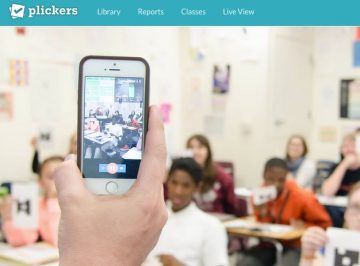
Plickers – Student Response System
‘Plickers’ is a free Student Response or All-Class Response System (SRS), useful for those without access to one-to-one devices in the classroom. All you need are some downloadable and printable class cards, the Plickers app, and one handheld device. The students hold their cards up based on their answer (A, B, C, D), the teacher […]

Hudl: Improving Athlete Performance Through Video Annotation
Hudl is a video annotation software that allows coaches and athletes to review their performance after matches and/or training sessions. After uploading video from either a dedicated video camera or a mobile device, tags can be added to individual players and passes to generate stats. If filming on a mobile app, tags can be added on […]
